
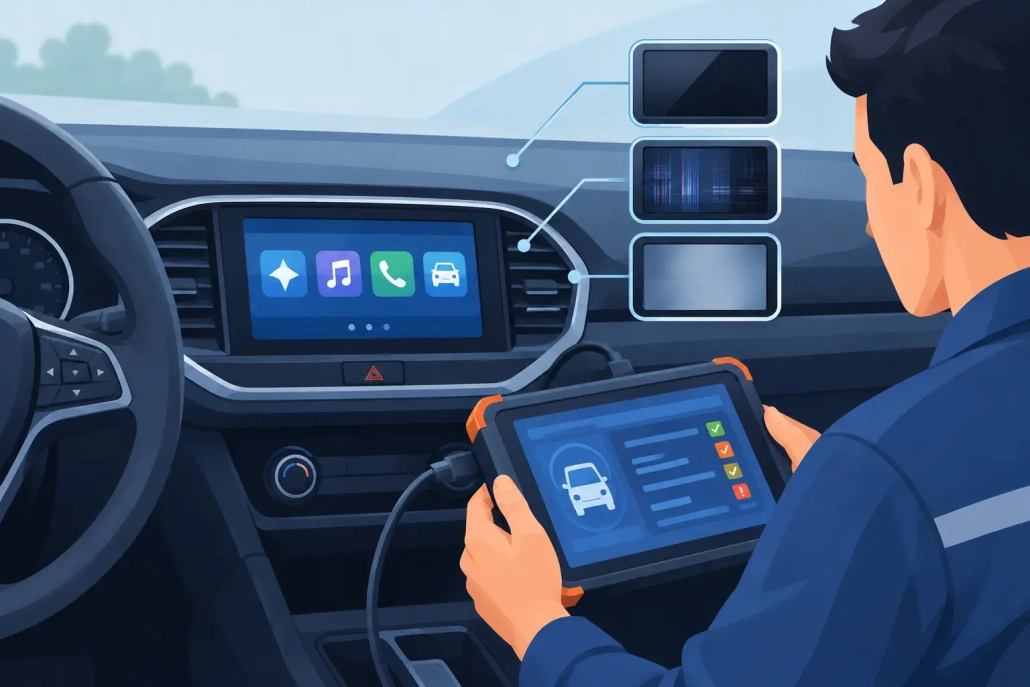
How to Diagnose Car LCD Screen Faults Properly
A missing odometer reading, fading trip computer or rows of dead pixels can make an otherwise healthy vehicle difficult to use. To diagnose car LCD screen faults properly, first establish whether the problem is limited to the display itself or is part of a wider instrument cluster, power supply or vehicle communication fault. That distinction prevents wasted time, unnecessary replacement units and the risk of creating mileage or coding issues.
Most modern dashboards contain far more than a simple screen. The LCD display, backlighting, gauges, warning lamps, circuit board and vehicle network all work together. A fault may look like a failed display when the actual cause is a damaged ribbon cable, poor solder connection or low supply voltage.
Start by Identifying the Exact LCD Symptom
The way an LCD fails is often the strongest clue. A display that is completely blank behaves differently from one with missing pixels, and both need a different diagnostic approach.
Pixel loss is one of the most common faults in instrument clusters. Portions of letters, numbers or warning messages disappear, often becoming worse when the dashboard is hot or cold. This usually points to a failing LCD connection, ribbon cable or bonding issue rather than a vehicle battery problem. Pressing on the display surround may temporarily alter the missing pixels, but it is not a repair and can cause further damage.
A dim screen can be caused by failed backlighting, deterioration within the display, or an illumination control issue. If the LCD information is faintly visible in daylight but cannot be read at night, the backlight circuit should be checked. If the whole instrument panel lighting is dim, look at the dashboard dimmer setting and related illumination supply before condemning the cluster.
A blank display with working gauges is more likely to be a local LCD, backlight or internal cluster fault. A blank display accompanied by dead gauges, warning lights or an intermittent cluster points towards power, earth, processor or communication problems.
Common symptoms worth recording before any repair include:
- Missing lines, digits or sections of characters
- A display that fades, flickers or changes with temperature
- A completely blank but illuminated screen
- No backlight, especially with the ignition or sidelights on
- A dashboard that cuts out and returns while driving
- Incorrect or absent warning messages alongside gauge faults
Photographs and a short video taken with the ignition on can be particularly useful. For garages sending a unit away, this evidence also gives the repairer a clear starting point.
How to Diagnose Car LCD Screen Faults Step by Step
Check the vehicle battery and charging voltage
Low voltage causes unusual electronic symptoms, especially after a flat battery, jump start or extended period without use. Before removing the cluster, check battery condition and charging performance. A weak battery can cause warning lights, reset trip data, slow display start-up and communication errors that disappear once supply voltage is restored.
This check is worthwhile, but do not assume every display fault is battery-related. Persistent pixel loss, permanent dark areas and a screen that only works in certain temperatures are normally internal cluster faults.
Confirm whether the cluster is waking up
Turn the ignition on and observe the full dashboard sequence. Do the needles sweep or move? Do warning lamps illuminate for their self-check? Is there a chime? Does the LCD show anything briefly before going blank?
If the cluster wakes normally but the LCD remains unreadable, the fault is likely contained within the display assembly or its associated circuitry. If nothing operates, check the correct fuses, power feeds and earths using the vehicle wiring information. A blown fuse should not simply be replaced and ignored – find out why it failed.
Check illumination behaviour
Test the display in daylight and in a dark environment. Then operate the vehicle’s dimmer control where fitted. If the screen content remains visible but there is no illumination, a backlight or illumination circuit fault is likely. If brightness changes normally but characters are missing, the problem is more likely to be the LCD panel or its connection.
On some vehicles, the display is designed to dim when the exterior lights are switched on. This can be mistaken for a fault, particularly if the dimmer has been turned down accidentally. It is a simple check, but it avoids dismantling a healthy dashboard.
Read fault codes, but use them in context
A diagnostic scan can reveal communication faults, low-voltage events and instrument cluster errors. It is useful evidence, particularly where the display issue is accompanied by warning lamps, non-working gauges or a no-start condition.
However, not every failed LCD will generate a diagnostic trouble code. A cluster can communicate perfectly with the vehicle while its display has lost pixels or its backlight has failed. Equally, a stored communication code does not automatically prove the cluster is faulty. It may relate to a previous low-voltage event, wiring issue or another control module.
Clear codes only after they have been recorded, then recheck after a controlled ignition cycle or road test where safe to do so. Codes that return immediately deserve investigation; historic codes may not be relevant to the current display complaint.
Look for heat, moisture and previous repair signs
LCD faults often develop gradually, but water ingress and heat can accelerate them. Inspect the dashboard area for condensation, windscreen leaks, corrosion at connectors or signs of liquid damage. In convertible, motorhome and commercial vehicle applications, moisture exposure can be especially relevant.
Also look for disturbed screws, damaged clips, missing seals or evidence that the cluster has been opened before. A poorly handled previous repair can damage the display ribbon, needles or circuit board. This does not mean the unit cannot be repaired, but it changes the diagnostic picture.
Separate a Display Fault From a Vehicle Wiring Fault
This is where specialist testing saves time. A cluster removed from the vehicle can be powered and assessed using the correct connections and an emulator that replicates relevant vehicle signals. This allows the display, gauges, warning lamps and internal functions to be tested away from the car.
If the unit repeatedly shows the same fault on a controlled test bench, the diagnosis is clear: the cluster requires internal repair. If it performs correctly off the vehicle but fails when refitted, attention should turn to vehicle wiring, connector pins, power feeds, earths or network communication.
This distinction matters for trade customers. Replacing an instrument cluster without proving the original unit faulty can leave the garage with the same complaint, plus the additional work of adapting or coding another module. It also creates avoidable questions over mileage accuracy and immobiliser compatibility.
When Repair Makes More Sense Than Replacement
A dealer replacement cluster can be expensive and may need ordering, programming and mileage configuration. Depending on the vehicle, it may also require security access or further coding before it will operate correctly.
Repairing the original unit is often the more straightforward option when the fault is confined to the LCD, pixels, backlight, gauges or internal electronics. The original mileage and vehicle coding remain with the unit, which reduces disruption and preserves originality. The right repair depends on the exact make, model, year and symptoms, as display designs and common failure points vary considerably between vehicles.
Avoid attempting a ribbon cable or LCD repair with household tools unless you have the correct equipment and experience. Instrument clusters contain delicate components, and a small error can turn a repairable screen fault into a no-communication cluster. Disconnecting or refitting a cluster without following the vehicle manufacturer’s procedures can also create further faults.
What to Send With an Instrument Cluster for Testing
If the fault cannot be confirmed in the vehicle, provide the vehicle registration, make, model, year, engine type and a clear description of the symptoms. State whether the display is blank, dim, intermittent or missing pixels, and whether the gauges and warning lights still work. Include details of recent battery failure, jump starting, water ingress or previous repairs.
At Cartronix, original clusters can be tested and repaired using specialist equipment, with postal repair options nationwide and while-you-wait appointments where suitable. A proper internal repair is a better outcome than fitting an unknown used unit, particularly when preserving mileage, coding and reliability matters.
If your LCD display is becoming difficult to read, act before it fails completely. A clear fault description and early diagnosis give you the best chance of a fast repair and less time off the road.




